Sunday, 25 February 2024
How FlyLady is Going
Sunday, 24 July 2022
Doing a Whole Lot of Cleaning - Update
Sunday, 26 June 2022
Too much to do
You know that feeling where there's a whole lot of things you need to /want to do, but there's not a lot of time to do them in and you're begin to feel just a little bit overwhelmed. Well that's me right now and I'm not really enjoying it.
If I'm honest I could probably get a lot more done if I organised myself a bit better and didn't do a lot of the sitting around not really doing anything that has become my normal mode. However, getting up the motivation to put my long-term gains over the easier, more appealing short-term gains has been particularly difficult recently. It's time to make some changes, or at least some updates, to help me actually get where I'm wanting to go.
The first thing I need to do is have a look at my goals again to remind myself why I'm doing all this and what it is I actually want. It could be that I actually decide that some of them are no longer right for me, in which case I can put them to one side, but for the others I just need a reminder as to why I want to do these things. It might be a good idea to put up some pictures and photos around the flat as a visual reminder to help keep me motivated as well.
One thing I'm already doing now is that I've decided to reduce the hours I do at work, only by one day at the moment but we'll see how it goes. This may seem a little bit counter intuitive as one of our goals is to save up money and to do things like learn how to surf and sail. However, I do also want to spend more time with family at the moment and this help with that. It'll also give me more time to research and pursue other forms of income that could actually earn us more and give us more financial stability and flexibility in the long run. This extra time is also going to make me less stressed and less stress means less comfort eating, which means a little less spending money.
Which brings me onto spending a little more time in making sure I'm eating properly. Firstly because that would be a good way of ensuring we're saving money as one of our biggest spends is on snack foods and take-aways /eating out. But it would also mean that I'd have more energy to do all the things I want to do as the relatively high sugar diet I have right now is not exactly one that fills you with lasting energy. If I'm honest I'm not really a fan of preparing food, I've basically lost all the enthusiasm I use to have for it, but the long term gain will be worth it.
The next thing that is important is that I need to properly organise my free time. At the moment I have a list of tasks I need to do and the days I would like to do them on, but nothing more than that. What usually happens is that when I come home from work I just space out for about 30 minutes if not more, than shower, eat, and then try and fit everything in to the time that is left usually leading to me going to bed late. Not getting enough sleep is definitely a had thing and the doing nothing at the start of the evening also sets the mood I'm in for the rest of that time. If I had a set schedule and got on with things as soon as I got home I would actually get a lot more done. The same is also true for days on the weekend when Ed is at work. This time gives me an opportunity to get more things done, especially if I schedule it out properly. So far all I've actually done is not a lot and then again try to fit everything into a very small amount of time. The scheduling would also mean I should be able to fit in things like reading and writing in my diary. Things that I always want to do but never get round to doing.
And all this organising and scheduling will mean one very important thing. That I will be able to have time to properly relax. Even though right now I'm doing a lot of nothing, there's always the knowledge that I should actually be doing something so it's not actually as relaxing as it should be and there's always just a little bit of guilt involved. By scheduling and actually doing all the things before hand I can then relax properly, go for walks, read a book, do my crafting, and actually enjoy doing these things properly.
So that's the plan. Already I can feel a part of me that just can't be bothered and wants to put it off stirring. The temptation is very strong, but it's not going to get me anywhere. I need to make a choice between the immediate me or the future me enjoying the life I'm planning for. I know which one I'd actually prefer, I just need to put in the effect to get there.
Sunday, 8 May 2022
Getting Back on Track
It would be true to say that I have let things slide a little bit over the last few months as we've been preparing for the wedding and dealing with a few other stressful things that come with the package called life. This is pretty much true of everything in my life in general, but there are a few areas where it has become particularly obvious and where I need to do some work pretty much straight away.
Finances
The first thing I need to get back on track is one of my main goals this year and that's to do with our finances. We should really have been being quite strict with this so that we could reach our savings goals as quickly as possible, but instead, we've been quite relaxed about it all. This was probably the worse time to do this as one of us was made redundant and then was only able to get part-time work for a bit. I've also been ill quite a few times this year (and when you're self-employed that means no pay), and there was the time we had already booked for our honeymoon. Now that the wedding and honeymoon are unfortunately over it's time to start concentrating on the finances again. This means spending less on takeaways, sweet treats and buying things we don't need, and doing more on putting money into our pensions and savings before we start working towards our long-term goals. These changes should all begin to show themselves in my monthly budget posts.
Health
Takeaways and sweet treats take us nicely onto the topic of health. Exercise isn't really the issue for me as I'm getting enough at work at the moment (though some additional stretching might be a good idea), but my diet has become particularly bad recently with quite a lot of sugar in it. The spots, low moods, lack of energy, weight gain, and a cycle that become out of whack are all telling me that things are not where they should be and it's time to get it sorted. I've downloaded the Flo app (specifically recommended if you don't have a particularly regular period) so I can keep an eye on my cycle and changes in my mood and energy level. I've also reluctantly brought some bathroom scales so I can use my weight as a rough guide as to whether or not things are changing in the right direction. Now I need to reduce the amount of sugar I'm eating on a daily basis, which basically means cutting out the chocolate and fizzy juice I've been having every day and moving my diet a lot further along the whole foods line than it is right now. All of this should help me get back to being the healthy relatively energetic person I was before.
The Flat
If there's one area that has shown visually just how chaotic things have become it's definitely the state of the flat. Admittedly it's quite a small space so it's easy for things to look bad even with just a small amount of clutter, but the flat has now become particularly bad and very far from the clean I would like. This means that it's not actually a particularly nice place to be spending our time and I want that to change. I remember sort of following a programme called the FlyLady in the past and I've decided to bring that back. The FlyLady isn't really a speedy process, more like a slow and steady one that allows you to get on top of things in bite-size chunks and then stay on top of them. So far I've done what I suppose you could classify as the hallway and the kitchen, and it already feels much, much, much better. I am dreading doing the living room area and my craft area, but I know it'll be worth it in the long run. One of the biggest issues for me here is not rushing ahead of myself and then getting burnt out. I'll get there and the flat will look great, and that's all I need to focus on.
So that is my plan to reset things that have gotten a little out of hand over the last few months. It never occurred to me that such a small wedding could have such an impact, though problems with my health etc were probably a contributing factor as well. My aim is to give myself until the end of June to get things running smoothly again, and then we can hopefully bumble along nicely from there, back to where we had originally planned on being.
Friday, 18 December 2020
Paperless Productivity: Final Decision
About this time last year, I decided that I would try out moving my paper-based productivity tools of a diary and notebook to a more digital format (you can see the post about that here). Other than the digital calendar I have linked to my phone it's never really been something I've tried before. I've always liked using paper and pen, as it just seems to work with how my brain is wired, and the satisfaction of ticking off the work that you've done, so this year has been a bit of an eye-opener.
After a year of testing out 14 different apps (twelve for productivity and two for note-taking) this is what I've found:
- There are a lot of options out there, so it's pretty likely you'll find something that suits you.
- Despite the variety, it's unlikely you'll find something that is 100% what you want, but then that's the same for all forms of productivity, including paper.
- That I actually prefer the simpler apps with the least amount of frills, which is not what I was expecting when I first started this. Really this should have been obvious, I've tried many complex versions of diaries, habit tracking, and task completion, and yet I always reverted back to simplest format. The other forms just made me feel like I should be busy, even when I really shouldn't.
Sunday, 15 November 2020
Paperless Productivity - Cute Note
I decided to end the year with another fun paperless productivity app. I found this one on the Google Store and it's Cute Note - DDay Todo. It's really cute and kitsch, and could actually - ironically - be the one I'm looking for. I should probably start by saying that this one does come with adverts that pop up now and then, but you can pay a subscription to have these adverts stopped. However, the free version works completely well as it is.
It's made up of four pages. The first page is Memo and I basically used it for notes and making shopping lists, which you put on digital sticky notes. You can arrange this page in two different ways by clicking on the squares on the top right and order them based on date, etc. One of the good things about this page is that you can add folders (by clicking on the folder icon on the top right) to separate your notes into different subjects or projects if you wanted. I don't have enough projects on to make that worth my while, so I just kept them on one page.
To make a note you just click on the Create button and then type anything you want. You can use the ribbon at the bottom to change the font size, colour, etc, and, most importantly, change the character of the note by clicking on the face. I, of course, picked all the cute animals, apart from the one connected to a jumper I'm knitting which is batman.
The second page is To-Do. You can name your notes whatever you want based what the to-dos are for, such as projects, but I decided to do a sticky note for each day of the week so it was like a diary.
To get started I just clicked on one of the notes that was already there and then make changes by editing those. I deleted the old to-dos and then added new ones by typing in box at the bottom and clicking on the cross. The picture doesn't show it, but there is a ribbon at the bottom which allows you to change the character of the note. It is a lot more characters on this page, but I went for the same cute ones as the memos, because I just couldn't help myself.
To name each sticky note and add new ones (in my case, for the days of the week) I clicked on the folder tab at the top right. Once each task is completed you just click on the note and then tick the to-do circle. Then you can delete all your completed tasks giving you a better idea about what you have left to do.
Of course, they don't automatically move to the next day's note, but I found being able to just view all the to-dos I hadn't completed on one page meant I still got them done even, if it wasn't on the day originally planned.
The third page is a D-Day / Countdown page.
As with the Memos page you can create folders for different projects (though I would think you would probably want to see all the countdowns on one page) and sort them by date. To create one you just click on the Create button, then fill in the details of the day you want a countdown to. You can also change the design on this as before.
I, of course, picked Christmas Day as that's my main date at the moment, but I'm sure others will appear.
The last page is more of a settings page. You can log on, using your Google account, which allows you back-up your notes to your Google Drive. Then clicking on the settings wheel also allows you to add passcodes and set everything up as auto. This is also where you pay to remove the ads.
As I said, this is my last paperless productivity of the year and I really loved it. It's nice and simple, and has everything I need at the moment to keep an eye on all the things I need to get done. This might change in the future, but, for now, the simplicity is good. The only thing I thought would be better is if I could get habits put in as well. However, I could just add them to the To-dos sticky notes and I have gotten a little bored of keeping tabs on those at the moment, so maybe it doesn't matter too much. That being said, this is app has definitely made it to the top of my list. Not going to lie, it's probably mainly to do with the cuteness of it, but whatever you need to do to get yourself organised.
Sunday, 18 October 2020
Paperless Productivity - Habitica
After taking a little bit of a break from productivity apps I moved onto a slightly more fun way of getting your tasks done, and that's by using Habitica. In a nutshell, this app is basically a way of gamifying your life. Where you build yourself an avatar and complete tasks and habits to level up your character and unlock in-game features. However, if I'm being honest I was just there for the pets you can get.
As with all the other apps, I was just using the free version on my phone. However, you can also use the app on your computer and I'm assuming the two link up through your account. There is an option to subscribe as well for additional features, which is actually quite cheap and, if I used this all the time I would think about it.Once you've downloaded the app you register your account and then create your avatar. Then it's time to go.
The main set up of the app is broken into four pages (shown at the bottom) made up of Habits, Dailies, To Do's, and Rewards. Each page comes with some little examples to start you off with and which you can edit and change if you want to.
There's then an option to set how difficult you think the habit will be, as well as adding how often you want to reset the streak, and add a tag if you're wanting to attach the habit to a larger goal, like getting healthy. If you don't complete these habits regularly they begin to decay in colour, you lose streaks and end up being penalised.
The next page is the Dailies. This is for daily habits and you can only click these to say you've completed them. I'm not entirely sure why this additional page is necessary when you already have Habits, however you can add much more information to this habit and they seem to have more consequences to completing or not. Setting them up is pretty similar as before.Click on the cross, add the name of the daily, any notes you want to add, and how difficult you think it is going to be to do. The biggest difference with the dailies it that you don't add a positive or negative and you can break down the habit with checklists.
You can schedule this habit, put how often you want to repeat it, adjust the number of times you've completed it (streaks), and also tag this habit to a specific goal.
There's also a possibility of adding a reminder. This didn't appear on my screen saver, as with other productivity apps, but it does appear on my phone's notification bar. As with the habits, completing or forgetting these dailies has positive or negative impacts on your Avatar.
As with the Dailies, you can also break the to do down into smaller tasks using the checklist, and I found this a pretty useful way of getting them done. As with the others, the to do's will begin to decay in colour if you don't complete them in the time you've scheduled.One thing I found with this page is that the tasks are ordered in the order you add them, with the newest at the top. This wasn't particularly helpful for how I wanted to use this app, but it's easy enough to change this by clicking on the three vertical lines at the top right and then filtering them by Scheduled. You can also use this to find all the to do's you have for one goal by clicking on the Tags.Each Habit, Dailies, and To Do's you complete gets you rewards in the form of food, potions (including hatching potions for your pets), and coins which you can then spend on equipment, or you can make up a reward yourself and decide how many coins this reward will cost you.The menu allows you to look at your skills and achievements, buy some more items and quests in the shops, look at what equipment you own, and purchase some gems which will then allow you to buy additional items.
There's also an option to do some socialising with other people using Habitica and build quest parties if that's what you're into.
The Tavern is probably the most useful part if you need to take a break from all those tasks and habits. By checking into the Inn these are then frozen and then have no negative impact on your Avatar.
I didn't really use these other options other than the Pets and Mounts section. Here you can hatch your pet, feed it up to become a mount, and equip your Avatar with it. I'm guessing these come in handy when you're completing a quest, but I just enjoy hatching and feeding them. Right now I have a bear as a mount and a wolf as a pet, and as far as I'm concerned my Avatar is living her best life.
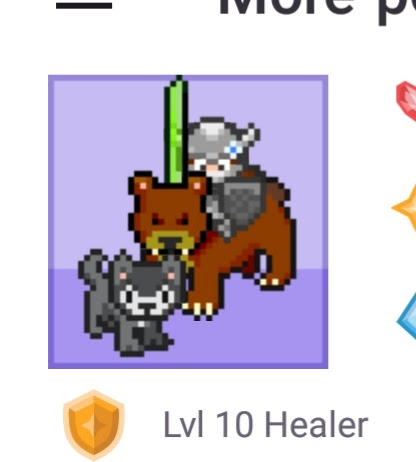
I have to admit that, even though I'm not a gamer in any way, I really liked this app. I don't think it necessarily added any more of an incentive for me to actual complete my to do's and habits, but it did add a pleasant element of fun to it. It also didn't use as much storage on my phone as I thought it was going to, which is always good. The only thing that didn't quite work for me was the fact that my habits and to-do's are on different pages and I much prefer having them all in one place so I can see everything I need to work on that day. However, I would still recommend this app and I think I'll put it with TickTick and Teux Deux as my top apps so far.


